QR Codes: Enhancing User Experience and Accessibility
In today’s digital world, small and medium enterprises (SMEs) are constantly seeking innovative ways to engage their customers and streamline their operations. One such tool that has gained popularity in recent years is the QR (Quick Response) code. These pixelated, square-shaped symbols have become a ubiquitous part of modern marketing strategies and have proven to be an effective and versatile tool for businesses of all sizes, including SMEs.
QR codes are perfect for facilitating contactless actions without requiring extensive user input. By simply pointing a camera at the QR code and clicking, users can access information, make payments, or perform various other actions with ease. This contactless nature makes QR codes convenient for users and can enhance the overall customer experience.
Furthermore, QR codes offer a multitude of functions, such as providing access to websites, downloading apps, sharing Wi-Fi network details, making payments, adding calendar events, and much more. Their versatility makes them an ideal tool for businesses looking to provide quick and efficient ways for customers to interact with their products and services.
What are QR codes?
QR codes are two-dimensional barcodes that can store a variety of information, such as website URLs, contact information, or product details. QR codes are designed to be scanned using a smartphone or a dedicated QR code scanner. Once scanned, the QR code can direct users to a website, display text, or trigger a specific action, making it a powerful and versatile tool for businesses.
Scan QRCode with different access types
Open the snowdon.dev vCard
- Point the camera at the QRCode
- Click the link that appears around the QRCode.
- The vCard will be downloaded from the QRCode and without making any network requests. Allowing offline access.

Open the marketeer website
- Point the camera at the QRCode
- Click the link that appears around the QRCode
- A website will open up the link `https://marketeer.snowdon.dev` in the default browser.

Using QR codes.
QR codes can be used in many formats and can invoke multiple application on many modern devices. On the go like devices (phones, tablets) and even VR (virtual reality) have the best support for QR codes. Many of the dollars of investment spent by the major players have went into VR technology, making the support QR codes almost ubiquitous.
There are many ways you can utilise this technology, and the best way will always be dependant on your business or your customers. From printing them out and displaying them in appropriate places. To using them within adverts and digital displays.
Warning: trust & security
When printing a QR code and displaying it on a medium (like a printout or sign), there is no mechanism to validate the origin of the QR code. Unlike when using web browsers, when using a printout, there is no asymmetric encryption to validate that a domain is owned by the current domain owner. Websites validate using certificates when making each request (during SSL secure socket layer) when the medium is viewed. If you want the viewer to trust what’s on the QR code, they need to trust what they scan the code from. Like an enclosed tablet or monitor display. Or from an email from a domain they trust. View our guide on hyperlink security to learn more about website security.QR codes, when scanned, can be acted upon based on its encoded data. Some of the many ways are as follows:
- Opening Apps
- Opening files
- Opening websites pages
- Opening any URL
- Opening raw text.
- Opening SMS client with a pre-generated message
- Opening a mail client with a pre-generated contents
- Opening a telephone number
- Opening an application
- Make payments with providers like PayPal.
- Inviting people to an event
- Connect to WiFi network
- Opening a vCard contact file in the default contacts app
QR codes have become an increasingly popular tool for bridging the physical and digital worlds. In many ways, QR codes serve as a practical bridge from physical images to digital content, similar to how hyperlinks function on the web. Just as hyperlinks can perform various functions, QR codes offer a range of capabilities. In fact, the range of functions they offer is almost identical. For instance, integrating QR codes and hyperlinks into emails or letters can save recipients time and effort by allowing them to quickly access links on their smartphones without the need for manual entry. This added convenience can greatly improve the overall user experience. It’s the difference between finding your glasses, typing out a large URL, correcting any mistakes, and doing so perhaps multiple times, versus simply looking in the direction and invoking an action. Including the ability to use multiple touchpoints provides added accessibility, which allows more users to engage with your product, and improves the options for people with disabilities.
Generate your own QR-Codes
Using our vCard and QR code generator application. Check here to start now. Completely free online tools.You may also quickly create QRCodes using applications you already have. For example, using Google Chrome you may right click on a page to create a QRCode that links to that page URL.
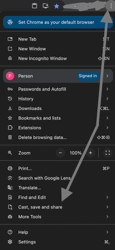
In Google Chrome - Menu -> Cast, save and share -> Create qrcode -> Downlaod
Using QR Codes on Websites and Coupon Campaigns
QR codes can be used in two closely related ways:
- Displayed on a website as a trusted delivery mechanism, and
- Embedded with a URL or coupon code that links users to a website or offer.
Both approaches allow businesses to connect offline and online experiences while maintaining control over how and when offers are presented.
QR Codes and Websites (Dynamic QR Codes)
QR codes can be displayed directly on a web page for users to scan. In this scenario, the website acts as a trusted place to host and manage QR codes. Because the website is generated and served dynamically, the site administrator can change the QR code, its destination, or its parameters at any time without reprinting materials or resending email campaigns.
This approach is often referred to as dynamic QR codes. Since the QR code is generated by a server, it can be adapted in real time based on available data such as time, location, or user demographics. For example:
- Users in the UK may be shown one coupon, while users elsewhere see a different offer.
- A coupon might only be visible or valid until 10:00 a.m.
- Special promotions can be enabled or disabled instantly.
In this model, the website provides a reliable and secure context for displaying QR codes while retaining full control over how offers are issued and redeemed.
QR Codes That Link to a Website or Coupon
Another common use of QR codes is embedding a URL directly into the QR code itself. When scanned by a compatible device, the QR code opens the encoded link automatically, taking the user to a specific page, promotion, or coupon.
This is an effective way to:
- Share a website or landing page without requiring users to type a URL.
- Link physical materials (posters, packaging, receipts) to digital experiences.
- Distribute coupon codes that redirect users to a redemption or validation page.
Because any valid URL can be encoded, different QR codes can link to different pages or campaigns on the same website. In this case, the QR code acts as a bridge to the site, while the website handles validation, tracking, and redemption.
Benefits of Integrating QR Codes into SME Websites
Integrating QR codes—either as on-site displays or as links back to the site—can offer SMEs several advantages:
Enhanced customer engagement
QR codes can provide additional context and value, such as product demos, reviews, tutorials, or related offers, enriching the customer experience.Contactless interactions and transactions
QR codes can link to payment portals, order forms, or booking systems, enabling safe and convenient contactless transactions.Promotional campaigns
QR codes can support promotions by unlocking exclusive discounts, downloadable content, or contest entries. These codes can be shared online or placed on physical materials to drive traffic back to the website.Customer insights and data collection
By linking QR codes to surveys, feedback forms, or gated offers, SMEs can gather valuable data about customer preferences and behaviour.Word-of-mouth sharing
Shareable coupons encourage customers to pass offers along to friends and colleagues. A simple message like, “Here’s a link—get £20 off with this code,” becomes a powerful referral mechanism.
Best Practices for Implementing QR Codes on SME Websites
When using QR codes as part of a website or coupon strategy, SMEs should consider the following best practices:
Ensure mobile optimisation
QR codes are primarily scanned on smartphones. Landing pages must be responsive, fast, and easy to use on mobile devices.Deliver clear value
The content behind a QR code should be meaningful—such as exclusive discounts, time-limited offers, or useful information—so users feel rewarded for scanning.Track and analyse performance
Use analytics to monitor scan rates, conversions, and engagement. This helps refine campaigns and measure return on investment.Design for different coupon types
Some coupons are intended to be widely shared, while others are personalised or restricted (for example, offers valid only for enterprise customers above a certain revenue threshold). Backend systems should be robust enough to handle coupons being shared beyond their intended audience.
Conclusion
QR codes provide SMEs with a flexible and powerful tool to connect users to their websites and offers. Whether displayed directly on a trusted website or used to link users to targeted landing pages and coupons, QR codes enable dynamic campaigns, easy sharing, and measurable results. When implemented thoughtfully, they can strengthen customer engagement, simplify transactions, and support sustainable business growth.
Feedback
Was this page helpful?
Glad to hear it! Please tell us how we can improve.
Sorry to hear that. Please tell us how we can improve.